Choosing between a wired and wireless mouse can be a bit of a challenge. A wired mouse is known for its reliability and quick response times, making it a favourite electronic among gamers. On the other hand, a wireless mouse offers the convenience of movement and helps keep your workspace looking neat and organized.
The best option really depends on your specific needs. Are you gaming, working, or just casually browsing the web? Factors like speed, battery life, and cost also play a significant role in your decision. Understanding the pros and cons of each type can enhance your overall experience, whether you’re deep into gaming or tackling tasks at the office.
Looking to find the perfect mouse for yourself? Stick around as we dive into the advantages and disadvantages of both wired and wireless options, guiding you to make the best choice based on your personal preferences and requirements.
Mouse Physical Differences
Some key differences between a wired and wireless mouse can influence your experience with them. Let’s dive into how they connect, their performance, power sources, and their price points to see what makes each type unique. When it comes to connectivity, wired mice are a breeze to use. You just plug them directly into your computer’s USB port, and you’re good to go. On the flip side, wireless mice connect via Bluetooth or a small USB receiver.
If you’re using Bluetooth, you’ll need to pair the mouse with your computer, while a USB receiver requires you to plug in a tiny dongle and switch on the mouse. Setting up a wired mouse is straightforward, but wireless options might take a bit more effort initially. However, they offer the perk of greater mobility. Just keep in mind that wireless mice can sometimes face interference from other devices, which might lead to a less stable cursor or occasional lag.
Ultra-Link Rechargeable Bluetooth Optical Mouse
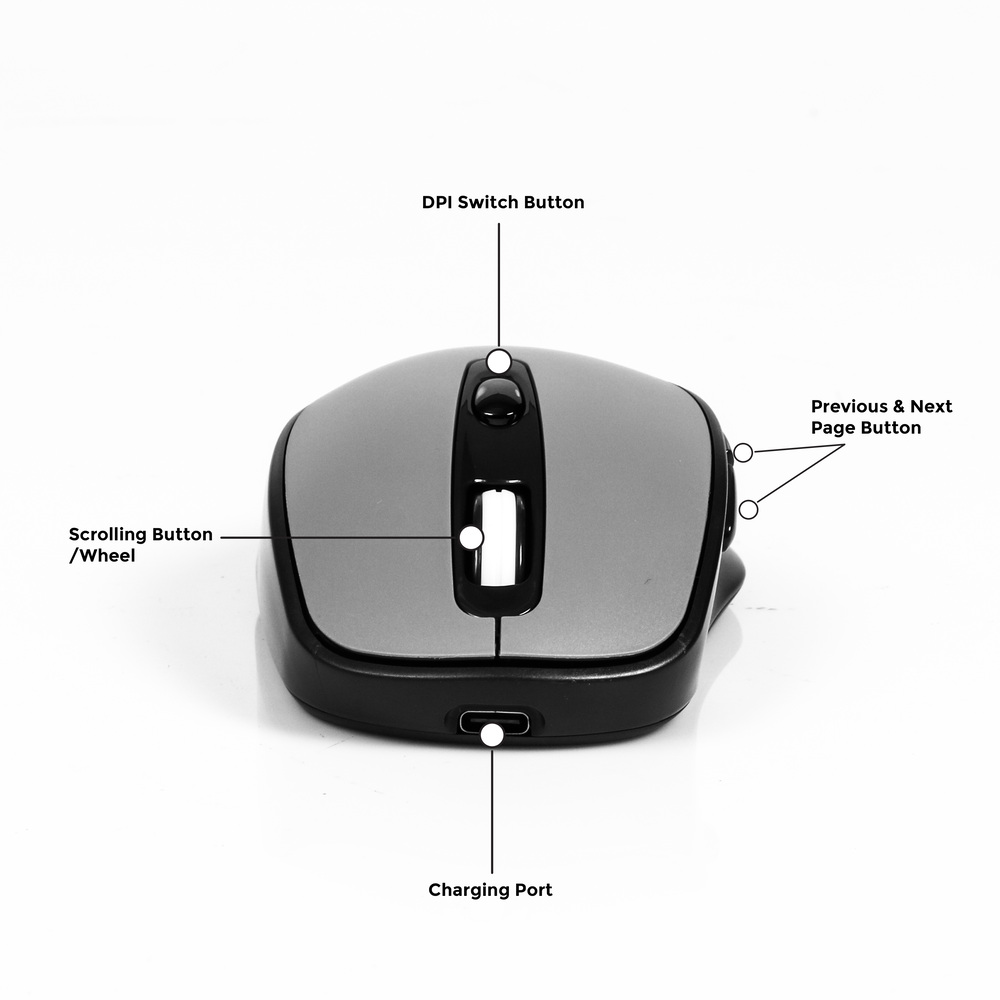
The Ultra-Link Rechargeable Bluetooth Optical Mouse is all about making your computing experience smoother and more efficient. With its ability to connect via both Bluetooth and 2.4GHz wireless, you can easily hop between devices without any hassle. Plus, it’s designed to be super responsive, so you won’t have to deal with annoying lag. The rechargeable battery is a game-changer too, giving you up to 35 hours of use on just one charge, perfect for those long work sessions.
Switching between Bluetooth and 2.4GHz is a breeze with this mouse, ensuring it works seamlessly with a variety of devices. You won’t have to worry about compatibility issues, making it a versatile choice for anyone who juggles multiple gadgets. The convenience of a rechargeable battery means you can ditch those disposable ones for good, and the included Type-C cable makes charging quick and easy.
With three adjustable DPI settings—800, 1200, and 1600—you can fine-tune the cursor sensitivity to match your needs, whether you’re working on detailed tasks or just browsing. The mouse also features six handy buttons that enhance productivity by providing shortcuts for quicker navigation. With up to 35 hours of continuous use, it’s perfect for those busy days or marathon gaming sessions, ensuring you stay connected and efficient.
Battery Life Efficiency
A wireless mouse requires a power supply. Some models come with batteries that you can replace every few months, while others have built-in rechargeable batteries that need to be plugged in for a charge from time to time. The battery life of a wireless mouse can differ from one model to another. Some can run for several months on a single charge, while others might need a recharge every week or so. It really comes down to how often you use the mouse and the specific features it offers. On the other hand, the wired mouse draws their power directly from the USB cable, which means you never have to worry about charging them or swapping out batteries. As long as they’re connected, they’re good to go and ready for action.
Flexible for Multiple Setups
A wireless mouse offers a lot of flexibility, allowing you to move freely around your workspace. You can kick back in your chair or even operate the mouse from a distance, which is super handy for giving presentations or managing a computer connected to a TV. On the other hand, a wired mouse requires to always be plugged in everywhere you go which is not very flexible for on-the-move professionals to work with. However, they tend to be more budget-friendly, making them a great option for offices that need to purchase multiple devices. Both the wireless and wired mouse come in ergonomic designs to help reduce the risk of hand strain. It’s a good idea to experiment with different shapes to find the one that feels most comfortable for you.
Portability for laptop users

When you’re using a laptop while out and about, having a wireless mouse can be a game changer. It fits easily in your bag without the hassle of tangled wires. A rechargeable Bluetooth mouse is particularly convenient since it does not require a receiver to be plugged in, making it even more portable. There are other compact wireless mouse options available that are ideal for cramped spaces, like those little tables at coffee shops or the limited area on an aeroplane tray. Just keep in mind that while these smaller options are great for portability, they might not provide the best comfort during extended use. Of course, a wired mouse is still a solid choice for laptop users. They offer dependable performance without the need for charging, which is a plus. However, it does not offer the same portability and fewer wires coiled up in your laptop bag which may led to a damaged receiver once plugged in.
Improved Cable Management

A wired mouse can make your desk look messy with all those cords lying around. If you prefer a clean and organized workspace, that can be unpleasant. Luckily, there are some solutions to this problem. One option is to use a mouse bungee, which keeps the cable elevated and prevents it from dragging or getting tangled up.
On the other hand, a wireless mouse offers a much tidier appearance. Without any cords to deal with, your desk remains uncluttered and spacious. This is especially beneficial if you tend to move your mouse around a lot or frequently switch between different devices.
Plus, a wireless mouse often comes in stylish designs that can enhance the look of your workspace. They’re available in a variety of colours and materials, so you can easily find one that matches your style and complements your desk setup.